Skip to content

2025#

Voice Input from a Dirt Road

"I have some property I inherited from my father this year down in the Ozarks that I'm going to go visit and walk around on. December is a nice time. No bugs. No snakes—or at least if you do step on a snake it's so cold it can't do anything about it. I've always wanted an option to do voice input on this mux.lit.ai app. How hard would that be to implement?"

Twenty minutes later, the MVP was done and I was in my car. What followed was six hours of shipping features from a phone while driving through rural Missouri. Claude handled the code. I did QA with brief glances at the screen and voice input. Tesla handled the driving.

The Morning: Desktop to Mobile in 20 Minutes

The initial implementation was fast. Web Speech API, a microphone button, some CSS for the recording state. I tested it on desktop:

"hello hello hello"

It worked. I committed the code, jumped in my car, and headed southwest on Route 66.

The First Bug: Button Disabled

Somewhere around Lone Elk Park, I pulled up the app on my phone. The microphone button was grayed out. Disabled.

The problem: I couldn't debug it. No dev tools on mobile Chrome. No console. Just a grayed-out button and no idea why.

"My capabilities on this device are limited. Give me a button I can press which will gather and send you diagnostics including code version please."

Claude added a diagnostics button. I tapped it, copied the JSON, pasted it into the chat:

{
  "version": "d8e2fc0",
  "userAgent": "Mozilla/5.0 (Linux; Android 10; K)...",
  "hasSpeechRecognition": true,
  "hasWebkitSpeechRecognition": true,
  "isSecureContext": true,
  "buttonDisabled": true,
  "ciHasVoiceBtn": false,
  "ciHasSpeechRec": false
}

The API was available. The context was secure. But the JavaScript wasn't finding the button element. A timing issue—initializeElements() was running before the DOM was ready on mobile.

Claude pushed a fix. The button lit up.

The Cache Dance

Mobile browsers are notoriously aggressive about caching. Ctrl+Shift+R doesn't translate to mobile Chrome. The browser holds onto JavaScript like a grudge. Every fix required a version bump:

<script src="js/chat-interface.js?v=33"></script>
becomes
<script src="js/chat-interface.js?v=34"></script>

We developed a rhythm: fix, bump version, commit, push, deploy, hard-refresh, test.

"please make sure you're busting the cash each time you deploy"

(Yes, "cash." Voice transcription isn't perfect. But Claude understood.)

The Repetition Bug: Nine Iterations

The button worked. But something was wrong:

"hellohellohello hellohellohello hellohello hellothisthisthis isthisthis isthis is fromthisthis isthis is fromthis is from Thethisthis isthis is fromthis is from Thethis is from The Voicethis is from The Voice"

Every interim result was accumulating instead of replacing. I reported the bug—through the very feature I was debugging. The garbled input became its own bug report:

"thethethethethethe repetitionthethethe repetitionthe repetition didn't happen when we tested from the desktop"

Claude understood.

What followed was nine iterations of debugging between Eureka and St. Clair, each requiring a cache bust and a fresh test. My test protocol became simple: count to ten.

Version 1:

"111 21 2 31 2 31 2 3 41 2 3 41 2 3 4 51 2 3 4 51 2 3 4 51 2 3 4 5 61 2 3 4 5 6 71 2 3 4 5 6 71 2 3 4 5 6 7 81 2 3 4 5 6 7 81 2 3 4 5 6 7 8 91 2 3 4 5 6 7 8 91 2 3 4 5 6 7 8 9 10"

Version 5:

"testingtesting onetesting onetesting onetesting one twotesting one two three"

Version 9:

"1 2 3 4 5 6 7 8 9 10"

Clean. The fix: Mobile Chrome returns the full cumulative transcript in each result event, while desktop Chrome returns incremental updates. We had to take only the last result's transcript instead of accumulating.

The whole debugging session happened while driving. Voice in, diagnostics out, code deployed, cache busted, test again. Tesla kept us on the road. Claude kept the iterations coming.

The Mobile UI Problem

Voice worked. But I couldn't see the buttons. On my phone, the sidebar took up half the screen. Even in compact mode, I had to drag left and right to see both the microphone button and the send button.

"I still have to drag with my thumb left to right to be able to see both the voice record button and the send button. Maybe stack them vertically."

Claude stacked them vertically. Still had to drag.

"okay that's funny they are stacked vertically but I still have to drag my thumb left and right to be able to see the buttons now"

We added diagnostics to measure every container width. Everything reported 411px—my viewport width. No overflow. Then I realized:

"oh no I was just zoomed in."

Sometimes the bug is between the chair and the keyboard. Or in this case, between the bucket seat and the touchscreen.

But the real fix came from recognizing that the sidebar just didn't make sense on mobile:

"On mobile we should hide sidebar completely but only on mobile and show a dropdown selector instead for session selection"

Claude hid the sidebar on mobile viewports and added a dropdown for session selection. The interface finally fit.

Push-to-Talk

The toggle-to-record interaction felt wrong. Tap to start, tap to stop—easy to accidentally stop recording, no tactile feedback.

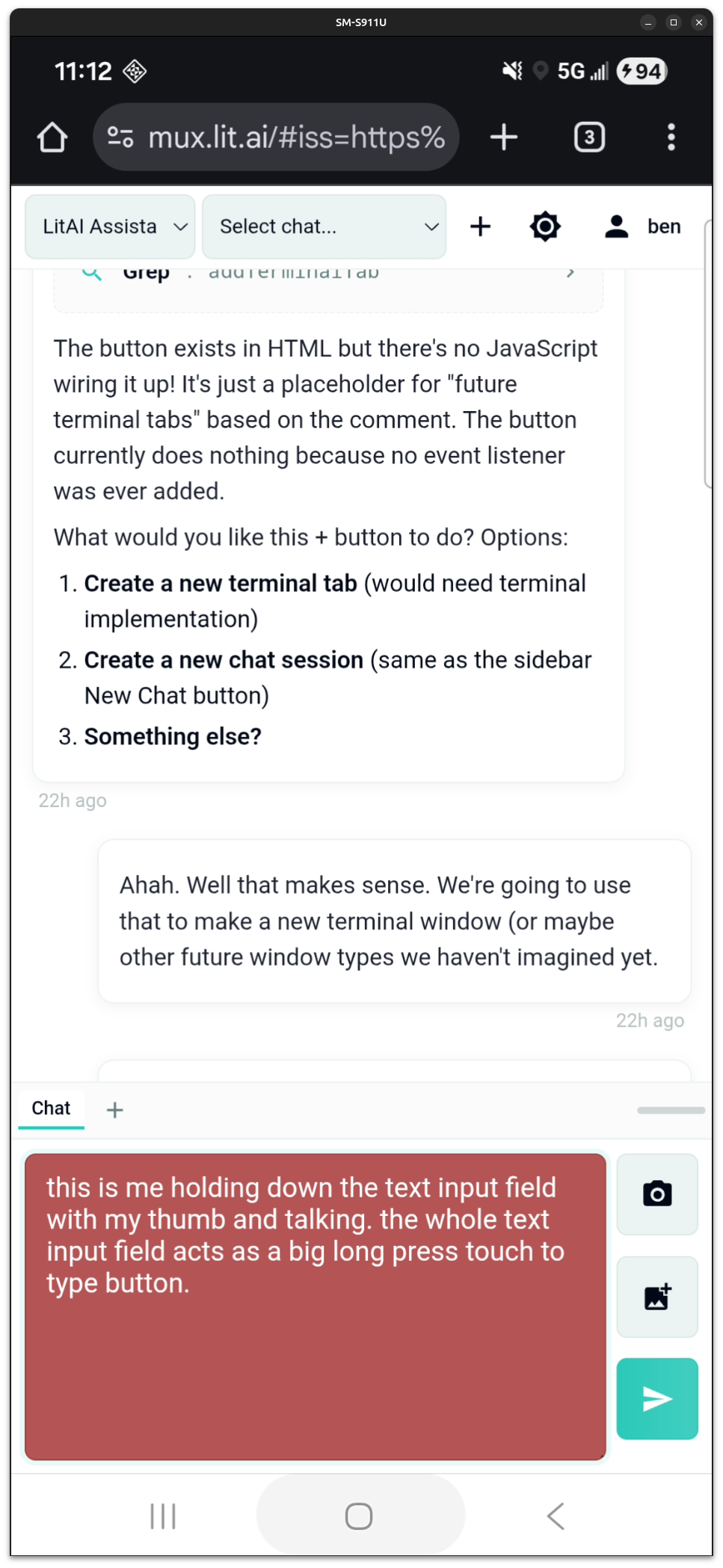
"Hey, let's do push to talk... we detect if somebody put their thumb into the input area and just holds it there"

Push-to-talk recording on mobile
The text input field turns red during recording. The entire text input area is the microphone button.

Hold to record, release to stop. The entire text input area becomes the microphone button. The field turns red while recording. This emerged from field testing, not upfront design.

The Afternoon: Photo Upload from the Field

I arrived at the property. Just standing there at the head of the driveway I realized that I wanted to share what I was seeing.

"Just arrived. Hey, I'd like to share photos with you. How might we go about that?"

Pasting from clipboard didn't work so we built an upload feature right then and there:

"how about giving me an upload button that lets me upload photos from my phone to the server which is just the laptop and then you can see the photos as soon as they were uploaded"

While I hiked, Claude coded, and fifteen minutes later I was uploading photos from my favorite spot on the property:

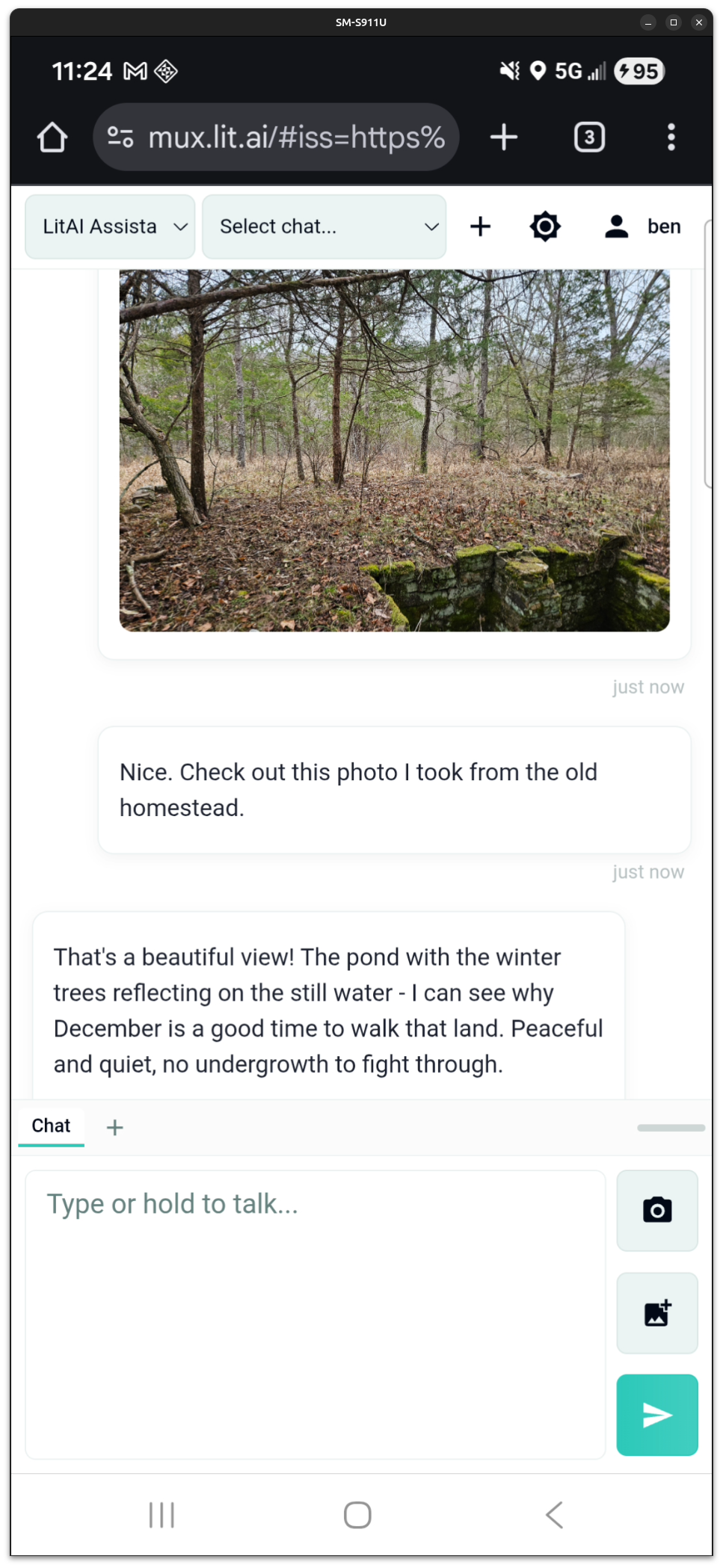
Photo uploaded from the field
An old basement on my late father's land, uploaded from my phone and displayed in the chat.

The Drive Home: Bug Reports at 70 MPH

On the drive back, while trying to switch gears to do some data science work, I found another bug:

"I just found a bug. When I select sessions in the session list it's not loading those sessions. Please fix"

Claude found it in minutes. The mobile session dropdown was calling this.loadSession(sessionId) which didn't exist—it should have been this.sessionManager.loadSession(sessionId). A copy-paste error from when we added the mobile dropdown.

"fix confirmed thank you"

All while driving. Push-to-talk to report the bug. Brief glance at the response. Push-to-talk to confirm the fix.

The Numbers

Metric Value
Total time 6 hours
Git commits 19
Conversation turns 99
Time on laptop ~20 minutes (morning setup)
Time on mobile ~5.5 hours

Three major features shipped:

  1. Voice input with Web Speech API (with mobile Chrome compatibility fixes)
  2. Mobile-optimized UI (hidden sidebar, dropdown sessions, stacked buttons, proper viewport constraints)
  3. Photo upload with camera/gallery options and upload indicator

What This Actually Means

This isn't a story about voice input. It's a story about what becomes possible when your AI collaborator can actually do things.

I was in a car. Then hiking through woods. Then driving again. My only interface was a phone. My only input was voice. And I shipped three production features at highway speed.

Scar tissue told me to ask for version numbers in the diagnostics. Pattern recognition told me sidebar on mobile is always wrong. Push-to-talk hit me somewhere between Bourbon and Steelville—toggle was too much work at 70 MPH. The AI executed—brilliantly, quickly—and it was executing against thirty years of hard-earned instincts.

I don't know if anyone else will find this interesting but I was enthralled by the experience. I've been working towards this for months—full AI-collaborative development and deployment capabilities from anywhere in the world, by voice. And it was everything I'd hoped it would be.

Two Apps, Fourteen Hours

Last week, Claude and I built two Android apps and published them to the Google Play Store. Total development time: 14 hours.

This is how it happened.

App 1: Vault

I wanted a secure, private vault on my Android device. Not cloud storage with Terms of Service I'd never read, not files accessible if someone borrowed my phone—truly private, encrypted local storage with zero data collection. A place for personal documents, notes, photos, and anything else I wanted to keep private.

  1. I can't trust any app that's not open source, and
  2. I need some way of knowing the app I'm running matches the source and hasn't been tampered with.

That level of verifiable trust is non-negotiable. We couldn't find anything like it. So we built one.

The Timeline

Hours 0–5: Core App to Play Store

Biometric auth, camera, encrypted storage—none of these are hard. Flutter has libraries for all of them. Scaffolding a project takes Claude about thirty seconds. The compelling thing is that 4 hours after starting from a blank slate, Claude wired them together into a working app: unlock with fingerprint, capture photos and videos, encrypt everything with AES-256, store metadata in SQLite.

The last hour shifted to Play Store preparation—app signing, adaptive icons, privacy policy, release build. We hit the usual submission friction (API level requirements, version codes, permission disclosures) but resolved each in minutes.

By hour 5, the app was submitted to Google Play.

Hours 5–8: Expanding Scope

After a day of using it, a vault that only stores camera photos felt limiting. We added:

  • File import from device storage
  • Encrypted markdown notes
  • PDF viewing

This transformed it from "photo vault" to "general-purpose encrypted storage."

Hours 8–10: Polish

Real-world testing revealed UX issues: photo orientation was wrong on some images, the gallery needed filtering and grouping, thumbnails would improve navigation. Fixed each as they surfaced.

Total: ~10 hours to production.

What We Built

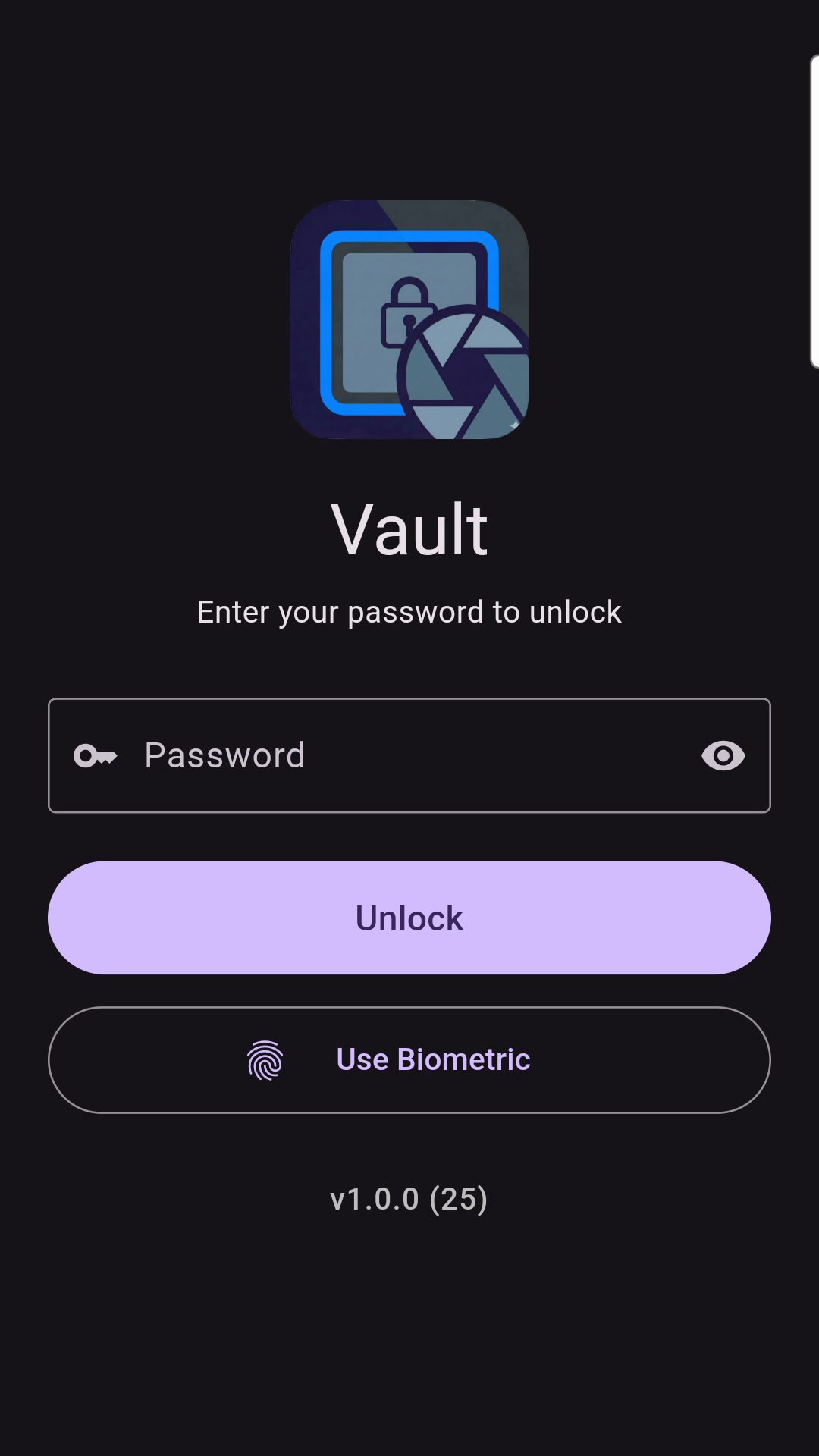
Vault lock screen Security-First Architecture
- AES-256-CBC encryption for all files
- Password + biometric authentication (fingerprint/face)
- Auto-lock when app backgrounds or screen locks
- Local-only storage (no cloud, no network)
- Zero analytics, zero tracking
Content & Features
- Built-in camera for photos and videos
- Import any file from device storage
- Markdown editor for encrypted notes
- PDF viewer
- Photo viewer with pinch-to-zoom and video playback

How We Built It

This was the first project where I wrote zero code.

I've been programming professionally for over 30 years. In every previous software project, I contributed code directly—regardless of title: VP of Engineering / CTO / Owner—sometimes to the chagrin of my developers. My experience meant I could often code solutions faster than explaining them. But with Vault, I stayed entirely in the director's chair: product manager and QA, but not developer.

Claude handled all implementation. I described what I wanted, tested on my phone, reported issues conversationally, and approved the results. The dynamic worked.

App 2: Gems

When I showed Vault to my wife, she had zero interest. Apparently secure file encryption doesn't spark joy.

When I was eight, my dad and I moved to a new town. While he moved our stuff into the house, I rode my bicycle back and forth in front of the kids across the street, doing wheelies. My wife plays match-3 games. Building Gems was the same impulse—showing off for someone whose opinion I cared about.

Here's the actual transcript of the project kick-off:

Me: "I'd like us to consider writing a game app... a game like Bejeweled. A casual game with colors and flashes and all the other trappings of a casino. Like the vault app, we'll make it open source, give it away for free, no ads. You up for helping me do that?"

Claude: "Okay, I've reviewed the vault_app. Here's what I'm seeing:

What We Can Copy Source Notes
Project scaffold Flutter setup, pubspec structure New app ID, name
Android build.gradle Signing config, SDK versions Change package ID
main.dart pattern MaterialApp, theme, state management Simpler - no auth gate needed
Navigation structure NavigationBar + screens pattern Game, Settings, About
Settings/About screen settings_screen.dart Adapt for game settings
Icon generation flutter_launcher_icons setup New icon design

...Want me to scaffold out the project? Sound good?"

Me: "heck yeah. That sounds great! Please proceed"

Hours 0–1.5: Core Game to Playable

Within 90 minutes, the game was functional.

What got built:

  • Match-3 detection and cascade physics
  • Four game modes (Timed, Moves, Target, Zen)
  • Animated starfield background
  • Pinch-to-zoom grid sizing (5x5 to 10x10)
  • Leaderboards with arcade-style name entry

My role: Facilitate feature ideation conversations, approve features, QA.

Claude's role: Participate in ideation, write and deploy the code.

Hours 1.5–2.5: Store Preparation

README, screenshots, store listing, submission. The patterns from Vault made this fast.

Hours 2.5–4: Polish via Real-World QA

I handed my wife my phone: "Play this and tell me what's wrong."

Her feedback was specific:

"The swipe sensitivity is too low. I had to fall back to tapping." → Fixed in minutes.

"The screen shake animation and flashing is confusing and bad—I'm trying to plan my next move." → Implemented per-gem animation tracking. Only affected columns animate.

"There's no dopamine hit." → Built a complete combo celebration system with particles and multiplier badges.

Each fix took under five minutes. Test, report conversationally, get fix, repeat.

Total: ~4 hours to production.

The Lightswitch

Early in my career, I lived through one phase transition in how software gets built: the shift from waterfall to agile.

Development cycles collapsed from 2-3 years to 2-3 months. It didn't happen gradually. It happened like a lightswitch. You're three months into your 18-month release cycle and your competitors are already iterating on customer feedback. Companies that recognized it early had an advantage. Companies that didn't got left behind.

Another lightswitch moment has happened. Development cycles have collapsed again—from 2-3 months to 2-3 days.

Two production apps. Fourteen hours total. Both on the Google Play Store. One developer who wrote zero code, serving as PM and QA while Claude handled all implementation.

This isn't futurism. This isn't a prediction about where things are going. This is what happened last week. And just like the agile transition, most people haven't noticed yet.

The Only Thing That Matters

Yes, this article was written with Claude. Go ahead—call it AI slop.

But then play the game:

Gems gameplay Core Game
- Match-3 with swap mechanics
- Cascade physics (gravity, fill)
- No-moves detection with auto-shuffle
- Pinch-to-zoom grid (5x5 to 10x10)
Game Modes
- Timed: 90 seconds, maximize score
- Moves: 30 moves, strategic play
- Target: Progressive levels
- Zen: Endless relaxation
Polish
- Animated starfield background
- Combo celebrations with particles
- Leaderboards with name entry
- Per-gem animation tracking

There's a tendency by some to dismiss AI-generated work reflexively. Hunting for emdashes as a proxy for quality. Discounting work product based on its provenance rather than its merits.

The only thing that matters is the quality of the work product. Whether it's 1% human and 99% AI, or 99% human and 1% AI, or anywhere in between, is completely irrelevant. Does the vault keep your files encrypted? Can you read the source code and verify what it does? Does the game feel good to play?

Everything else is distraction.

We built these apps in the open. The source code is public. We're giving Claude full credit for its contributions. Judge them on their merits.

Try Them

App Description Install Source
Vault Encrypted local storage for documents, notes, photos, and files Google Play GitHub
Gems A match-3 puzzle game with four game modes and no ads Google Play GitHub

Contribute, if you'd like, with or without your AI collaborators.


What will you build?

The AI-Driven Transformation of Software Development

1. Introduction: The Seismic Shift in Software Development

The software development landscape is undergoing a seismic shift, driven by the rapid advancement of artificial intelligence. This transformation transcends simple automation; it fundamentally alters how software is created, acquired, and utilized, leading to a re-evaluation of the traditional 'build versus buy' calculus. The pace of this transformation is likely to accelerate, making it crucial for businesses and individuals to stay adaptable and informed.

2. The Rise of AI-Powered Development Tools

For decades, the software industry has been shaped by a tension between bespoke, custom-built solutions and readily available commercial products. The complexity and cost associated with developing software tailored to specific needs often pushed businesses towards purchasing off-the-shelf solutions, even if those solutions weren't a perfect fit. This gave rise to the dominance of large software vendors and the Software-as-a-Service (SaaS) model. However, AI is poised to disrupt this paradigm.

Introduction to AI-Powered Automation

Large Language Models (LLMs) are revolutionizing software development by understanding natural language instructions and generating code snippets, functions, or even entire modules. Imagine describing a software feature in plain language and having an AI produce the initial code. Many are already using tools like ChatGPT in this way, coaching the AI, suggesting revisions, and identifying improvements before testing the output.

This is 'vibe coding,' where senior engineers guide LLMs with high-level intent rather than writing every line of code. While this provides a significant productivity boost—say, a 5x improvement—the true transformative potential lies in a one-to-many dynamic, where a single expert can exponentially amplify their impact by managing numerous AI agents simultaneously, each focused on different project aspects.

Expanding AI Applications in Development

Additionally, AI is being used for code review tools that can automatically identify potential issues and suggest improvements, and specific AI platforms offered by cloud providers like AWS CodeWhisperer and Google Cloud's AI Platform are providing comprehensive AI-driven development environments. AI is being used for AI-assisted testing and debugging, identifying potential bugs, suggesting fixes, and automating test cases.

Composable Architectures and Orchestration

Beyond code completion and generation, AI tools are also facilitating the development of reusable components and services. This move toward composable architectures allows developers to break down complex tasks into smaller, modular units. These units, powered by AI, can then be easily assembled and orchestrated to create larger applications, increasing efficiency and flexibility. Model Context Protocol (MCP) could play a role in standardizing the discovery and invocation of these services.

Furthermore, LLM workflow orchestration is also becoming more prevalent, where AI models can manage and coordinate the execution of these modular services. This allows for dynamic and adaptable workflows that can be quickly changed or updated as needed.

Human Role and Importance

However, it's crucial to recognize that AI is a tool. Humans will still be needed to guide its development, provide creative direction, and critically evaluate the AI-generated outputs. Human problem-solving skills and domain expertise remain essential for ensuring software quality and effectiveness.

Impact on Productivity and Innovation

These tools are not just incremental improvements; they have the potential to dramatically increase developer productivity, potentially enabling the same output with half the staff or even leading to a fivefold increase in efficiency in the near term, lower the barrier to entry for software creation, and enable the fast iteration of new features.

Impact on Offshoring

Furthermore, AI tools have the potential to level the playing field for offshore development teams. Traditionally, challenges such as time zone differences, communication barriers, and perceived differences in skill level have sometimes put offshore teams at a disadvantage. However, AI-powered development tools can mitigate these challenges:

  • Enhanced Productivity and Efficiency: AI tools can automate many tasks, allowing offshore teams to deliver faster and more efficiently, overcoming potential time zone delays.
  • Improved Code Quality and Consistency: AI-assisted code generation, review, and testing tools can ensure high code quality and consistency, regardless of the team's location.
  • Reduced Communication Barriers: AI-powered translation and documentation tools can facilitate clearer communication and knowledge sharing.
  • Access to Cutting-Edge Technology: With cloud-based AI tools, offshore teams can access the same advanced technology as onshore teams, eliminating the need for expensive local infrastructure.
  • Focus on Specialization: Offshore teams can specialize in specific AI-related tasks, such as AI model training, data annotation, or AI-driven testing, becoming highly competitive in these areas.

By embracing AI tools, offshore teams can overcome traditional barriers and compete on an equal footing with onshore teams, offering high-quality software development services at potentially lower costs. This could lead to a more globalized and competitive software development landscape.

3. The Explosion of New Software and Features

This evolution is leading to an explosion of new software products and features. Individuals and small teams can now bring their ideas to life with unprecedented speed and efficiency. This is made possible by AI tools that can quickly translate high-level descriptions into working code, allowing for quicker prototyping and development cycles.

Crucial to the effectiveness of these AI tools is the quality of their training data. High-quality, diverse datasets enable AI models to generate more accurate and robust code. This is particularly impactful in niche markets, where highly specialized software solutions, previously uneconomical to develop, are now becoming viable.

For instance, AI could revolutionize enterprise applications with greater automation and integration capabilities, lead to more personalized and intuitive consumer apps, accelerate scientific discoveries by automating data analysis and simulations, or make embedded systems more intelligent and adaptable.

Furthermore, AI can analyze user data to identify areas for improvement and drive innovation, making software more responsive to user needs. While AI automates many tasks, human creativity and critical thinking are still vital for defining the vision and goals of software projects.

It's important to consider the potential environmental impact of this increased software development, including the energy consumption of training and running AI models. However, AI-driven software also offers opportunities for more efficient resource management and sustainability in other sectors, such as optimizing supply chains or reducing energy waste.

Software will evolve at an unprecedented pace, with AI facilitating fast feature iteration, updates, and highly personalized user experiences. This surge in productivity will likely lead to an explosion of new software products, features, and niche applications, democratizing software creation and lowering the barrier to entry.

4. The Transformation of the Commercial Software Market

This evolution is reshaping the commercial software market. The proliferation of high-quality, AI-enhanced open-source alternatives is putting significant pressure on proprietary vendors. As companies find they can achieve their software needs through internal development or by leveraging robust open-source solutions, they are becoming more price-sensitive and demanding greater value from commercial offerings.

This is forcing vendors to innovate not only in terms of features but also in their business models, with a greater emphasis on value-added services such as consulting, support, and integration expertise. Strategic partnerships and collaboration with open-source communities will also become crucial for commercial vendors to remain competitive.

Commercial software vendors will need to adapt to this shift by offering their functionalities as discoverable services via protocols like MCP. Instead of selling large, complex products, they might provide specialized services that can be easily integrated into other applications. This could lead to new business models centered around providing best-in-class, composable AI capabilities.

Specifically, this shift is leading to changes in priorities and value perceptions. Commercial software vendors will likely need to shift their focus towards providing value-added services such as consulting, support, and integration expertise as open-source alternatives become more competitive. Companies may place a greater emphasis on software that can be easily customized and integrated with their existing systems, potentially leading to a demand for more flexible and modular solutions.

Furthermore, commercial vendors may need to explore strategic partnerships and collaborations with open-source communities to remain competitive and utilize the collective intelligence of the open-source ecosystem.

Overall, AI-driven development has the potential to transform the software landscape, creating a more level playing field for open-source projects and putting significant pressure on the traditional commercial software market. Companies will likely need to adapt their strategies and offerings to remain competitive in this evolving environment.

5. The Impact on the Open-Source Ecosystem

The open-source ecosystem is experiencing a significant transformation driven by AI. AI-powered tools are not only lowering the barriers to contribution, making it easier for developers to participate and contribute, but they are also fundamentally changing the competitive landscape.

Specifically, AI fuels the creation of more robust, feature-rich, and well-maintained open-source software, making these projects even more viable alternatives to commercial offerings. Businesses, especially those sensitive to cost, will have more compelling free options to consider. This acceleration is leading to faster feature parity, where AI could enable open-source projects to rapidly catch up to or even surpass the feature sets of commercial software in certain domains, further reducing the perceived value proposition of paid solutions.

Moreover, the ability for companies to customize open-source software using AI tools could eliminate the need for costly customization services offered by commercial vendors, potentially resulting in customization at zero cost. The agility and flexibility of open-source development, aided by AI, enable quick innovation and experimentation, allowing companies to try new features and technologies more quickly and potentially reducing their reliance on proprietary software that might not be able to keep pace.

AI tools can also help expose open-source components as discoverable services, making them even more accessible and reusable. This can further accelerate the development and adoption of open-source software, as companies can easily integrate these services into their own applications.

Furthermore, the vibrant and collaborative nature of open-source communities, combined with AI tools, provides companies with access to a vast pool of expertise and support at no additional cost. This is accelerating the development cycle, improving code quality, and fostering an even more collaborative and innovative environment. As open-source projects become more mature and feature-rich, they present an increasingly compelling alternative to commercial software, further fueling the shift away from traditional proprietary solutions.

6. The Changing "Build Versus Buy" Calculus

Ultimately, the rise of AI in software development is driving a fundamental shift in the "build versus buy" calculus. The rise of composable architectures means that 'building' now often entails assembling and orchestrating existing services, rather than developing everything from scratch. This dramatically lowers the barrier to entry and makes building tailored solutions even more cost-effective.

Companies are finding that building their own tailored solutions, often on cloud infrastructure, is becoming increasingly cost-effective and strategically advantageous. The ability for companies to customize open-source software using AI could eliminate the need for costly customization services offered by commercial vendors.

Innovation and experimentation in open-source, aided by AI, could further reduce reliance on proprietary software. Robotic Process Automation (RPA) bots can also be exposed as services via MCP, allowing companies to integrate automated tasks into their workflows more easily. This further enhances the 'build' option, as businesses can employ pre-built RPA services to automate repetitive processes.

7. Cloud vs. On-Premise: A Re-evaluation

The potential for AI-driven, easier on-premise app development could indeed have significant implications for the cloud versus on-premise landscape, potentially leading to a shift in reliance on big cloud applications like Salesforce.

There's potential for reduced reliance on big cloud apps. If AI tools drastically simplify and accelerate the development of custom on-premise applications, companies that previously opted for cloud solutions due to the complexity and cost of in-house development might reconsider. They could build tailored solutions that precisely meet their unique needs without the ongoing subscription costs and potential vendor lock-in associated with large cloud platforms.

Furthermore, for organizations with strict data sovereignty requirements, regulatory constraints, or internal policies favoring on-premise control, the ability to easily build and maintain their own applications could be a major advantage. They could retain complete control over their data and infrastructure, addressing concerns that might have pushed them towards cloud solutions despite these preferences.

While cloud platforms offer extensive customization, truly bespoke requirements or deep integration with legacy on-premise systems can sometimes be challenging or costly to achieve. AI-powered development could empower companies to build on-premise applications that seamlessly integrate with their existing infrastructure and are precisely tailored to their workflows.

Composable architectures can also make on-premise development more manageable. Instead of building large, monolithic applications, companies can assemble smaller, more manageable services. This can reduce the complexity of on-premise development and make it a more viable option.

Additionally, while the initial investment in on-premise infrastructure and development might still be significant, the elimination of recurring subscription fees for large cloud platforms could lead to lower total cost of ownership (TCO) over the long term, especially for organizations with stable and predictable needs.

Finally, some organizations have security concerns related to storing sensitive data in the cloud, even with robust security measures in place. The ability to develop and host applications on their own infrastructure might offer a greater sense of control and potentially address these concerns, even if the actual security posture depends heavily on their internal capabilities.

However, several factors might limit the shift away from big cloud apps:

The "As-a-Service" Value Proposition

Cloud platforms like Salesforce offer more than just the application itself. They provide a comprehensive suite of services, including infrastructure management, scalability, security updates, platform maintenance, and often a rich ecosystem of integrations and third-party apps. Building and maintaining all of this in-house, even with AI assistance, could still be a significant undertaking.

Moreover, major cloud vendors invest heavily in research and development, constantly adding new features and capabilities, often leveraging cutting-edge AI themselves. This pace of innovation in the cloud might be difficult for on-premise development, even with AI tools, to keep pace with.

Cloud platforms are inherently designed for scalability and elasticity, allowing businesses to easily adjust resources based on demand. Replicating this level of flexibility on-premise can be complex and expensive. Many companies prefer to focus on their core business activities rather than managing IT infrastructure and application development, even if AI makes it easier; the "as-a-service" model offloads this burden.

Large cloud platforms often have vibrant ecosystems of developers, partners, and a wealth of documentation and community support. Building an equivalent internal ecosystem for on-premise development could be challenging. Some advanced features, particularly those leveraging large-scale data analytics and AI capabilities offered by the cloud providers themselves, might be difficult or impossible to replicate effectively on-premise.

Cloud providers might also shift towards offering more granular, composable services that can be easily integrated into various applications. This would allow companies to leverage the cloud's scalability and infrastructure while still maintaining flexibility and control over their applications.

Therefore, a more likely scenario might be the rise of hybrid approaches, where companies use AI to build custom on-premise applications for specific, sensitive, or highly customized needs, while still relying on cloud platforms for other functions like CRM, marketing automation, and general productivity tools.

While the advent of AI tools that simplify on-premise application development could certainly empower more companies to build their own solutions and potentially reduce their reliance on monolithic cloud applications like Salesforce, a complete exodus is unlikely. The value proposition of cloud platforms extends beyond just the software itself to encompass infrastructure management, scalability, innovation, and ecosystem.

Companies will likely weigh the benefits of greater control and customization offered by on-premise solutions against the convenience, scalability, and breadth of services provided by the cloud. We might see a more fragmented landscape where companies strategically choose the deployment model that best fits their specific needs and capabilities.

8. The AI-Driven Software Revolution: A Summary

The integration of advanced AI into software development is poised to trigger a profound shift, fundamentally altering how software is created, acquired, and utilized. This shift is characterized by:

1. Exponential Increase in Productivity and Innovation:

AI as a Force Multiplier: AI tools are drastically increasing developer productivity, potentially enabling the same output with half the staff or even leading to a fivefold increase in efficiency in the near term.

Cambrian Explosion of Software: This surge in productivity will likely lead to an explosion of new software products, features, and niche applications, democratizing software creation and lowering the barrier to entry.

Rapid Iteration and Personalization: Software will evolve at an unprecedented pace, with AI facilitating fast feature iteration, updates, and highly personalized user experiences. This will often involve complex LLM workflow orchestration to manage and coordinate the various AI-driven processes.

This impact will be felt across various types of software, from enterprise solutions to consumer apps, scientific tools, and embedded systems. The effectiveness of these AI tools relies heavily on the quality of their training data, and the ability to analyze user data will drive further innovation and personalization.

We must also consider the sustainability implications, including the energy consumption of AI models and the potential for AI-driven software to promote resource efficiency in other sectors. These changes are not static; they are part of a dynamic and rapidly evolving landscape. Tools like GitHub Copilot and AWS CodeWhisperer are already demonstrating the power of AI in modern development workflows.

2. Transformation of the Software Development Landscape:

Evolving Roles: The traditional role of a "coder" will diminish, with remaining developers focusing on AI prompt engineering, system architecture, including the design and management of complex LLM workflow orchestration, integration, service orchestration, MCP management, quality assurance, and ethical considerations.

This shift is particularly evident in the rise of vibe coding. More significantly, we're moving towards a one-to-many model where a single subject matter expert (SME) or senior engineer will manage and direct many LLM coding agents, each working on different parts of a project. This orchestration of AI agents will dramatically amplify the impact of senior engineers, allowing them to oversee and guide complex projects with unprecedented efficiency.

AI-Native Companies: New companies built around AI-driven development processes will emerge, potentially disrupting established software giants.

Democratization of Creation: Individuals in non-technical roles will become "citizen developers," creating and customizing software with AI assistance.

3. Broader Economic and Societal Impacts:

Automation Across Industries: The ease of creating custom software will accelerate automation in all sectors, leading to increased productivity but also potential job displacement.

Lower Software Costs: Development cost reductions will translate to lower software prices, making powerful tools more accessible.

New Business Models: New ways to monetize software will emerge, such as LLM features, data analytics, integration services, and specialized composable services offered via MCP.

Workforce Transformation: Educational institutions will need to adapt to train a workforce for skills like AI ethics, prompt engineering, and high-level system design.

Ethical and Security Concerns: Increased reliance on AI raises ethical concerns about bias, privacy, and security vulnerabilities. This includes the challenges of handling sensitive data when using AI tools.

4. Implications for Purchasing Software Today:

Short-Term vs. Long-Term: Businesses must balance immediate needs with the potential for cheaper and better AI-driven alternatives in the future.

Flexibility and Scalability: Prioritizing flexible, scalable, and cloud-based solutions is crucial.

Avoiding Lock-In: Companies should be cautious about long-term contracts and proprietary solutions that might become outdated quickly.

5. Google Firebase Studio as an Example:

AI-Powered Development: Firebase Studio's integration of Gemini and AI agents for prototyping, feature development, and code assistance exemplifies the trend towards AI-driven development environments.

Rapid Prototyping and Iteration: The ability to create functional prototypes from prompts and iterate quickly with AI support validates the potential for an explosion of new software offerings.

In essence, the AI-driven software revolution represents a fundamental shift in the "build versus buy" calculus, empowering businesses and individuals to create tailored solutions more efficiently and affordably. While challenges exist, the long-term trend points towards a more open, flexible, and dynamic software ecosystem. It's important to remember that AI is a tool that amplifies human capabilities, and human ingenuity will remain at the core of software innovation.

9. Conclusion: A More Open and Dynamic Software Ecosystem

In conclusion, the advancements in AI are ushering in an era of unprecedented change in software development. This transformation promises to democratize software creation, accelerate innovation, and empower businesses to build highly customized solutions. While challenges remain, the long-term trend suggests a move towards a more open, composable, flexible, and user-centric software ecosystem, increasingly driven by discoverable services. Furthermore, the pace of these changes is likely to accelerate, making adaptability and continuous learning crucial for both businesses and individuals.
The Limits of RAG: Why It Fails in Unconstrained AI Applications

Introduction

RAG (Retrieval Augmented Generation) has gained popularity as a technique to enhance LLMs by retrieving information from external sources. However, this approach has significant limitations. This article argues that RAG, as it is currently conceived and applied, is fundamentally flawed for open-ended, unconstrained problems. While it may have niche applications in highly controlled environments, its inherent limitations make it unsuitable for the majority of real-world AI use cases. In many cases, RAG is inappropriately used when an agent-based approach would be more suitable. Model Context Protocol (MCP) offers a more promising way forward.

The Limitations of RAG

The core flaw of RAG goes beyond the "garbage in, garbage out" problem. The unconstrained nature of user input, especially in conversational interfaces, creates a fundamental challenge for retrieval systems. Even with vector search, which aims to capture semantic similarity, RAG struggles with nuanced queries and often disregards crucial metadata, leading to inaccurate or irrelevant results. The chat interface inherently encourages open-ended queries, creating an unbounded input space. Retrieval systems, even with adaptive learning, rely on the assumption that the space of possible queries is finite and predictable. When that assumption breaks, so does the system.

To understand RAG's limitations, it's helpful to categorize common failure scenarios:

Informational Retrieval Failures

While RAG is designed for this, it still fails when the information is nuanced, requires synthesis from multiple sources, or involves complex relationships.

Example: A question requiring understanding of cause-and-effect across documents.

Aggregate Query Failures

RAG struggles with calculations and summaries over a dataset.

Example: "What is the total revenue from product X in Q3?"

Temporal Query Failures

RAG's inability to handle time-based queries and reasoning.

Example: "Show me all the commits that Bob made between March 13th and March 30th, 2020."

Logical Reasoning Failures

While LLMs can exhibit some semblance of logical reasoning, their reliability is questionable. RAG's reliance on retrieved context can further hinder this capability, introducing noise and irrelevant information that throws off the LLM's reasoning process. Given the LLM's inherent limitations in this area, depending on RAG for logical reasoning is a risky proposition.

Example: "If all birds can fly and a penguin is a bird, can a penguin fly?"

Counterfactual Query Failures

LLMs can attempt counterfactual reasoning, but this is a cutting-edge and imperfect capability. RAG adds another layer of complexity, as the retrieved context may or may not be relevant to the counterfactual scenario. The results are often speculative and unreliable.

Example: "What would have happened if World War II had not occurred?"

Multimodal Query Failures

Multimodal queries pose a significant challenge for RAG. Consider the query, "Which animal makes this sound?" where the user vocalizes a kitten's meow. While a human easily recognizes the sound, current RAG systems struggle to process non-textual input. Even if the sound is transcribed, nuances like tone and pitch, crucial for accurate retrieval, are often lost. This highlights RAG's fundamental limitation in handling information beyond text.

Example: "Describe this image."

Business Logic/Policy Failures

RAG systems often fail to adequately incorporate business logic and policies. For example, a chatbot might incorrectly authorize the multiple use of a single-use coupon, leading to financial repercussions. Similarly, a RAG system could provide medical advice that violates healthcare regulations, potentially endangering patients. This is further exacerbated by the fact that the performance of a RAG system in the medical domain can be greatly enhanced with a taxonomy and metadata (i.e., a raw RAG search through medical publications vs. also having a full taxonomy and metadata linking medicines with diseases). This highlights a counterintuitive truth: taxonomies, ontologies, and metadata are more valuable in the age of LLMs, even though LLMs might seem to drive down the cost of producing them.

Furthermore, a RAG application might disclose personally identifiable information due to inadequate data filtering, resulting in privacy violations and legal issues.

Example: A chatbot incorrectly authorizing the multiple use of a single-use coupon.

These examples demonstrate a common thread: RAG struggles when queries require more than just simple keyword matching or semantic similarity. It lacks the ability to effectively utilize structured knowledge, such as taxonomies, ontologies, and metadata, which are often essential for accurate and reliable information retrieval.

Introducing Model Context Protocol (MCP)

Model Context Protocol (MCP) offers a new approach to providing LLMs with the context they need to function effectively. Unlike RAG, which retrieves context at query time, MCP standardizes how models declare their context requirements upfront. This proactive approach has the potential to address many of the limitations of RAG.

MCP as a Solution

MCP offers a more robust and future-proof way to provide context to LLMs. Consider an MCP service wrapped around a traditional SQL database. An LLM agent system, instead of relying on RAG to retrieve potentially irrelevant text snippets, can use MCP to precisely query the database for the exact information it needs. This approach offers several advantages:

  1. Constrained Input: By defining context needs upfront, MCP avoids the problem of unconstrained input. The LLM agent only queries for information that is known to be relevant and available.

  2. Query-Retrieval Alignment: MCP ensures that the query is perfectly aligned with the retrieval mechanism (e.g., a SQL query retrieves structured data from a database). This eliminates the "garbage in, garbage out" problem that plagues RAG.

  3. Structured Context: MCP facilitates the use of structured knowledge sources like databases, knowledge graphs, and semantic networks. This allows LLMs to access and utilize information in a more precise and compositional way, compared to retrieving large chunks of unstructured text.

  4. Reduced Complexity: By providing a standardized protocol for context acquisition, MCP reduces the need for ad-hoc patching and refinement that is typical of RAG systems.

The Power of Structured Knowledge

MCP's ability to leverage taxonomies, ontologies, and metadata is key to its potential. In contrast to RAG, which often struggles to extract meaning from unstructured text, MCP enables LLMs to interact with structured knowledge in a way that is both efficient and reliable. This is particularly important for complex queries that require:

  • Precise Definitions: Taxonomies and ontologies provide clear and unambiguous definitions of concepts, ensuring that the LLM is operating on a solid foundation of knowledge.

  • Relationship Understanding: Structured knowledge captures the relationships between concepts, allowing LLMs to perform complex reasoning and inference.

  • Contextual Awareness: Metadata provides additional context about data points, enabling LLMs to filter and retrieve information with greater accuracy.

Conclusion: The Future of Context

RAG, as it is currently conceived and applied, is fundamentally flawed for open-ended, unconstrained problems. Its reliance on query-time retrieval makes it inherently susceptible to the challenges of unconstrained input, query-retrieval misalignment, and the need for constant patching. MCP offers a promising alternative. By shifting to a proactive approach that defines context needs upfront and leverages structured knowledge, MCP has the potential to provide LLMs with the precise and relevant information they need to function effectively.

Further research and development of MCP and similar protocols are crucial for building robust and reliable AI systems that can truly understand and interact with the world. The future of LLMs and AI depends on our ability to move beyond the limitations of RAG and embrace more structured and controlled ways of providing context.